
Productivity · Guide
How to Be More Productive in Meetings (2026 Guide)
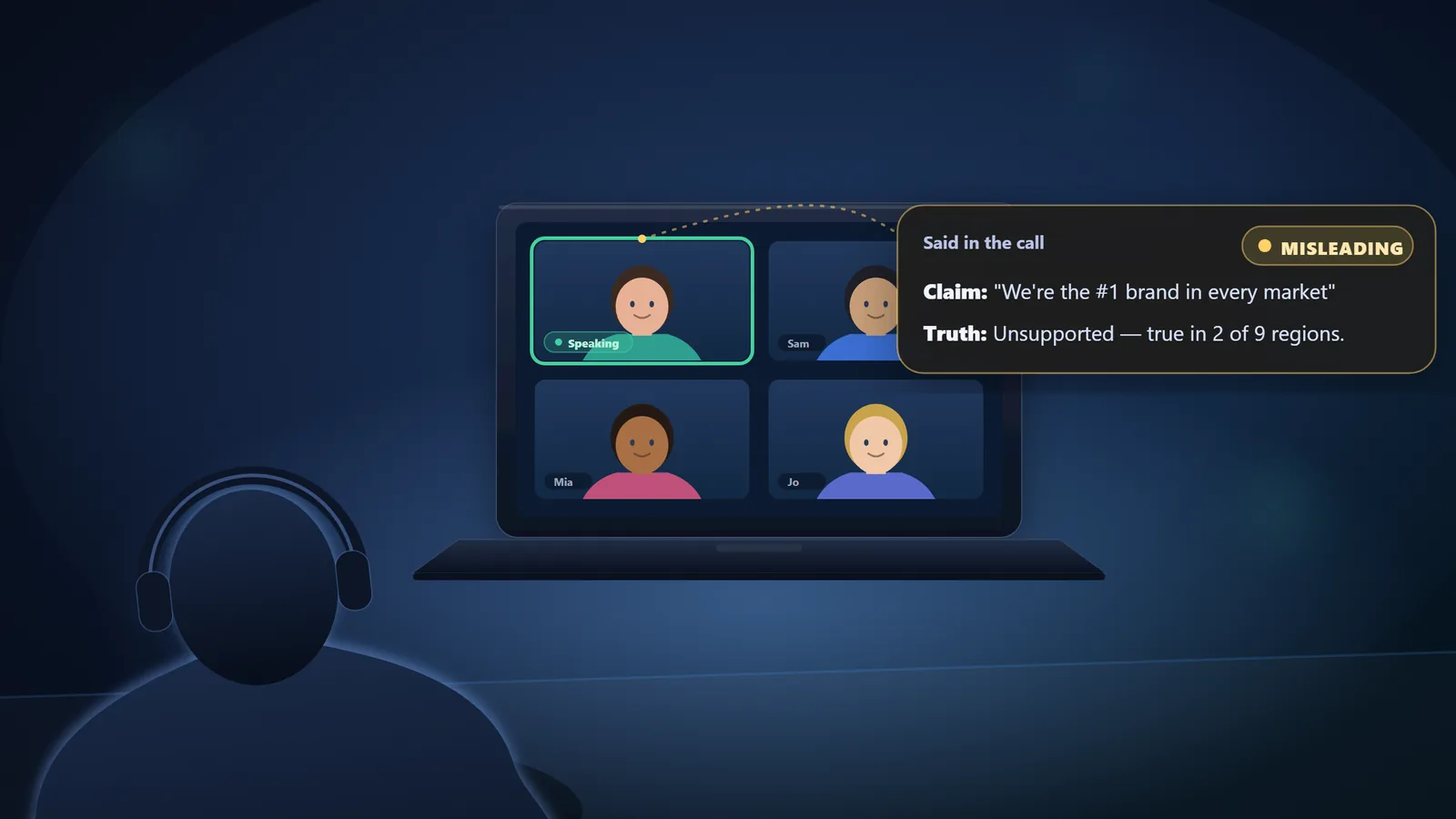
To be more productive in meetings: only meet when a live decision is needed, give the meeting one clear outcome and an agenda in advance, keep it under eight people and under 30 minutes, single-task, and verify the key claims your decision depends on. Productive is not just shorter. It is a correct, owned decision.
Roughly a third of meetings are unnecessary, and for large companies those wasted meetings add up to an estimated $100 million a year, according to research led by organizational psychologist Dr. Steven Rogelberg and reported by CBS News. Most advice on how to be more productive in meetings stops at shorter agendas and fewer invites. That helps, but it misses the real problem: a fast, tidy meeting that decides on the wrong facts is worse than a slow one. This guide covers both the fundamentals every good meeting needs and the accuracy step almost no one talks about.
- Why meetings feel so unproductive in 2026
- Before the meeting (steps 1–4)
- During the meeting (steps 5–8)
- After the meeting (steps 9–10)
- How long should a meeting be, and how many people?
- Productive is not short. It is correct.
- A 30-minute agenda template you can copy
- How to fact-check a meeting in real time
- Frequently asked questions
Why meetings feel so unproductive in 2026
The volume is the first problem. Microsoft's 2025 Work Trend Index found that meetings and calls per person are up 192% since early 2020, that 60% of meetings are ad hoc with no calendar invite or agenda, and that the average employee is interrupted roughly every two minutes by a meeting, message, or notification. When your day is that fragmented, individual contributors now lose an average of 3.7 hours a week to unproductive meetings, up from 1.7 hours in 2019, per Asana's 2024 State of Work Innovation report.
Attention is the second problem. About 67% of people admit to doing other work during virtual meetings, according to a Zippia survey, and Stanford research shows video calls are more cognitively draining than in-person ones, so a distracted attendee misses more than they realize. The third problem is the quiet one: even a crisp meeting can agree to something on the strength of a confident but wrong statement. The ten steps below fix all three, in the order a meeting actually happens.
Before the meeting (steps 1–4)
The most productive meeting is often the one you never hold. Most of the win is decided before anyone joins the call.
Decide whether the meeting should exist
Before scheduling, ask what live decision this meeting will make. If you cannot name one, it is a status update, and a status update belongs in a message, a shared doc, or a short recorded clip. With a third of meetings already considered unnecessary, cancelling the ones that could have been an email is the single biggest productivity gain available to you.
Give it one outcome and an agenda in advance
Every meeting that survives step 1 gets one named outcome, for example “choose the vendor” or “approve the launch date,” plus a short agenda sent at least a day ahead. The agenda is not bureaucracy. It tells invitees whether they need to attend, lets them prepare, and gives you a clear test at the end: did we reach the outcome, and on what basis?
Invite only the people who move the decision
Bigger meetings make worse decisions. That is the core finding behind Harvard Business Review's research on the “Rule of 7”: past a certain size, every extra attendee measurably lowers the odds of a good call. Invite the people who own or shape the decision, and let everyone who only needs the result read the notes afterward.
Match the length to the purpose
Work expands to fill the time you book it in, so booking an hour almost guarantees an hour. Book the shortest slot that fits the decision, keep the default short, and end early when you are done. Reserve the long slot only for decisions that genuinely need the discussion.
During the meeting (steps 5–8)
Once the call starts, productivity is about protecting attention and protecting the quality of the information the decision rests on.
Assign roles: facilitator, note-taker, timekeeper
A meeting without a facilitator drifts. Name someone to keep the conversation on the agenda, someone to capture decisions and action items, and someone to watch the clock. On a 30-minute call one person can hold two of these roles. Roles turn “pay attention” from a vague hope into specific jobs, which is the most reliable way to keep people engaged.
Protect attention and stop multitasking
Multitasking in meetings feels efficient and is the opposite. Because video calls already demand more cognitive effort than in-person conversation, splitting your focus means you miss the one sentence that mattered. Close email and chat, put your phone out of reach, and give your attention an active job. People who are capturing decisions or checking claims stay present. People told only to “focus” drift.
Capture decisions and the claims behind them
Memory is not a recording device. Studies of the forgetting curve show people lose a large share of what they hear within a day, and the multitaskers around you have already missed parts of it live. Keep a running record of the decisions and, just as important, the claims those decisions rest on: the numbers, deadlines, and “we already tested that” assertions that will drive what everyone does next.
Verify the claims your decision rests on
This is the step almost every “productive meetings” article skips, and it matters most. In a 2025 SoftServe study, 58% of leaders said key business decisions are based on inaccurate or inconsistent data most of the time, and Harvard Business Review found 71% of senior managers consider meetings unproductive. When a claim will drive the decision, check it before the meeting ends. Ask for the source, or verify it live.
After the meeting (steps 9–10)
End with owned actions and a date
Close every meeting the same way: restate the decision, name who owns each next step, and set a date. Thirty seconds of this prevents the “wait, what did we agree?” thread, the quiet tax that makes one meeting spawn three more. If the decision hinged on a claim you could not verify in the room, the action item is simple: confirm it before anyone acts on it.
Share notes and beat the “meeting hangover”
Send the decision and action items within the hour, while they are accurate, so the people who did not need to attend stay informed without another meeting. This also blunts the “meeting hangover,” the lingering drain after a bad meeting that Asana found workers reported after 28% of meetings, most of whom then vented about it to colleagues. A clear record turns a forgettable call into a decision people can act on.
How long should a meeting be, and how many people?
Two questions decide most of a meeting's productivity before it starts. The research gives clear defaults.
Productive is not short. It is correct.
Almost every guide treats meeting productivity as a time problem: fewer meetings, shorter meetings, tighter agendas. Those matter, and steps 1 through 10 deliver them. But a meeting's real output is a decision, and a decision is only as good as the information behind it. A 25-minute meeting that approves a budget based on “we're the number one brand in every market” is not productive when that claim is true in two of nine regions. It is efficient at being wrong.
That is why step 8, verifying the claims your decision depends on, is the highest-leverage habit on this list. Fix the accuracy problem and the speed problem gets easier too, because you stop re-litigating decisions that were built on something that was never true. The same principle underpins our guide to fact-checking a video in real time: catch the claim while it still matters, not after it has shaped what everyone believes.
A 30-minute agenda template you can copy
Paste this into the calendar invite. It bakes the decision, the roles, and the time-box into the meeting itself.
Decision this meeting will make: [one sentence]
Attendees (keep under 8): [decision owners only]
Roles: Facilitator [name] · Notes [name] · Timekeeper [name]
- 0–3 min: State the decision and the one question we must answer.
- 3–12 min: Present the options and the key facts each rests on.
- 12–20 min: Discuss. Flag any claim the decision depends on and verify it.
- 20–27 min: Decide. Name the decision out loud.
- 27–30 min: Assign owners and dates. Confirm what still needs checking.
Within 1 hour: send decision + action items + any claim to confirm.
How to fact-check a meeting in real time
Steps 7 and 8, capturing claims and verifying them, are exactly where a fast conversation beats a human. You cannot listen, take notes, and look up a statistic at the same time without missing the next point. That gap is what Truth by LetBe.ai is built to close. It is a Chrome extension that listens to the tab audio on Google Meet, Zoom, or Microsoft Teams and shows AI-assisted verdicts (TRUE, FALSE, MISLEADING, OPINION, or UNCLEAR) on spoken claims as they happen, so a confident assertion gets checked before it becomes a decision.
Truth is an AI-assisted research aid, not an oracle. It surfaces a likely verdict and the reasoning so you can confirm anything important against the source. But in a live meeting, “there is reason to doubt that number” arriving in real time is often the difference between a good decision and an expensive one. You can read more about the platform behind it on our about page.
Stay on top of your next call
Add Truth to Chrome, press Start on your Meet, Zoom, or Teams tab, and get AI-assisted verdicts on what's said. Guest credits included.
Being more productive in meetings is not really about shaving minutes. It is about making sure the time you do spend produces decisions you can trust: fewer meetings, held only when a decision is needed, with the right people, kept short, and settled on what is actually true. Do that, and the meeting was worth having.
Frequently asked questions
How can I be more productive in meetings?
Only hold the meeting if it needs a live decision, give it one clear outcome and an agenda in advance, invite fewer than eight people, keep it to 25 to 30 minutes, single-task, and verify the key claims your decision depends on. A meeting is productive when it ends in an accurate, owned decision.
How long should a meeting be?
Default to 25 or 30 minutes. Work expands to fill the time you book (Parkinson's Law), and the World Economic Forum notes shorter default slots force sharper agendas. Book 50 minutes only when the decision genuinely needs the extra discussion, and end early when the decision is made.
How many people should be in a meeting?
Keep decision meetings under eight people. Harvard Business Review's research on the "Rule of 7" finds each attendee added beyond seven reduces the likelihood of a good decision by about 10%. Extra people can receive the notes instead of attending live.
Why are so many meetings unproductive?
Roughly a third of meetings are unnecessary, costing large companies an estimated $100 million a year (research by Dr. Steven Rogelberg, reported by CBS News). The usual causes are no clear purpose, too many attendees, constant multitasking, and decisions made on incomplete or inaccurate information.
How do I stay focused during virtual meetings?
Close email and chat, put your phone out of reach, and give yourself an active job such as capturing decisions or verifying claims, so your attention has somewhere to go. Stanford research shows video calls demand more cognitive effort than in-person, so single-tasking matters more, not less.
How do I remember what was said in a meeting?
Do not rely on memory. People forget a large share of what they hear within a day. Keep a running record of the decisions and the claims behind them, either by assigning a note-taker or using a tool that transcribes and surfaces key statements as they are spoken.
What is a meeting hangover?
A "meeting hangover" is the lingering drain and lost focus after a bad meeting. Asana's 2024 research found workers reported one after 28% of their meetings, and most vented about it to colleagues afterward, so a bad meeting keeps costing time long after it ends.
Can you fact-check claims made in a meeting in real time?
Yes. Browser tools like Truth by LetBe.ai listen to the tab audio on Google Meet, Zoom, or Microsoft Teams and show AI-assisted verdicts on spoken claims as the conversation happens, so decisions are based on accurate information rather than confident assertion.

Truth is an AI-assisted claim-checking Chrome extension built on LetBe.ai, a hosted platform for running AI workflows. We write about productivity, media literacy, and verifying what you hear. Truth is a research aid, not a guarantee of truth; always confirm important claims with primary sources.